Understand the two areas
Open Me > Settings > Trash.
| Area | Closet and statistics | Existing relationships | Retention |
|---|---|---|---|
| Memory Box | Hidden from Closet and normal statistics | Still visible in related Outfits, Inspiration, and Calendar; available in new selectors | Not automatically deleted |
| Trash | Hidden from Closet and normal statistics | Hidden from Outfits, Inspiration, Calendar, and new selectors | Prompts for permanent cleanup after 30 days |
Memory Box items can appear in a selector without being restored. Check the corresponding tab when you need to restore them. Items moved to Trash are not offered in these selectors.
Move or restore an item
- Open an item.
- Choose Move to Memory Box or Move to Trash.
- Read the impact and confirm.
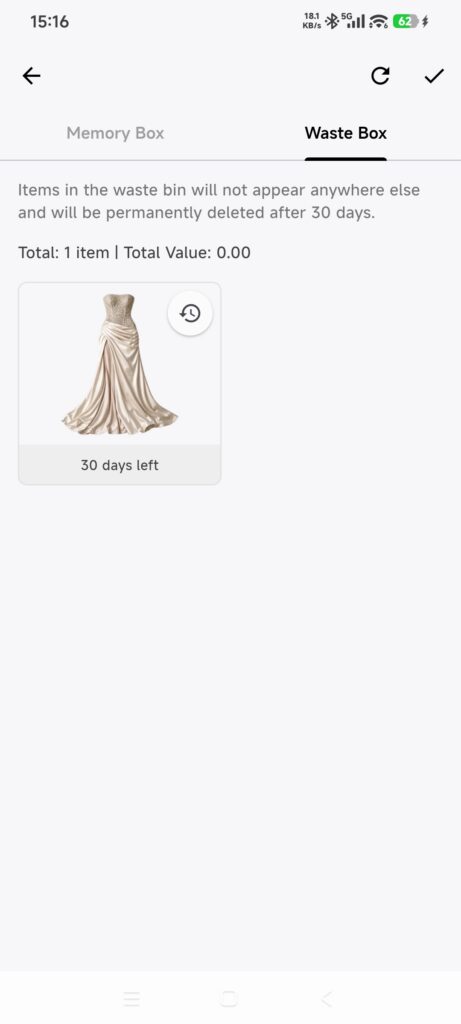
- Open the corresponding Trash tab to restore an item.
- Select the item and choose Restore.
- Return to Closet, clear filters, and confirm it appears.
Restoring clears any inconsistent Memory Box or Trash state.
Permanently delete an item
- Select an item in Memory Box or Trash.
- Choose Delete Permanently and read the irreversible warning.
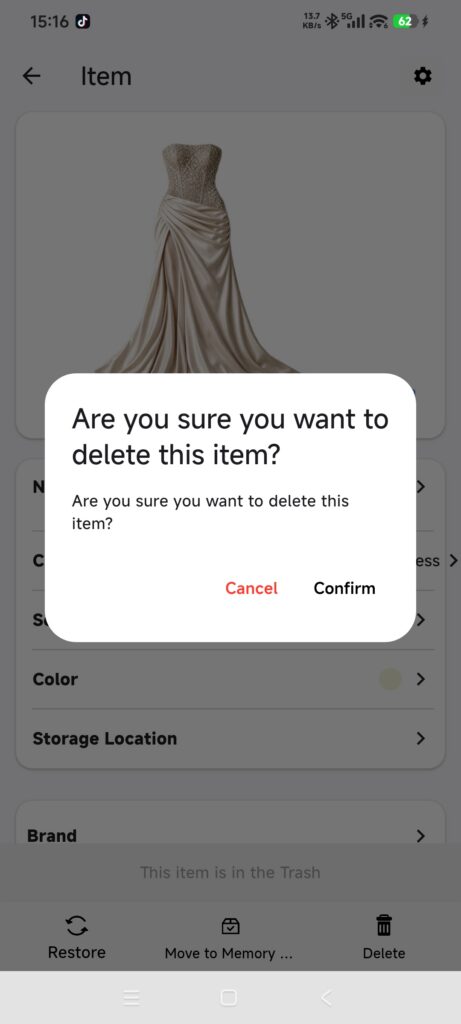
- Confirm only when you no longer need the item.
Permanent deletion removes the item image, Calendar records, Outfit and Inspiration relationships, and related AI references. When items in Trash reach 30 days, DressWise may ask whether to delete them in bulk. You can cancel; failed items are reported for retry.
Confirm it worked
- Memory Box items are hidden from Closet and normal statistics but remain in existing relationships.
- Items in Trash are hidden from Closet, statistics, relationships, and selectors.
- Restored items return to Closet.
- Permanently deleted items no longer appear in Trash.
If something is unexpected
- An item is missing from Closet: check both Trash tabs.
- A Memory Box item appears in Calendar or a selector: that is expected and does not mean it was restored.
- A Trash cleanup failed: retry only the failed items after checking the network.
- You want to recover a permanently deleted item: permanent deletion cannot be undone.
- An Outfit or Inspiration is not in Trash: these are separate records and are deleted permanently from their own pages.