Open item list controls
- Open Closet and check the current closet.
- Tap the gear in the top-right corner.
- Choose Item List.
- In the grid, use the sort control, Category, and Other.
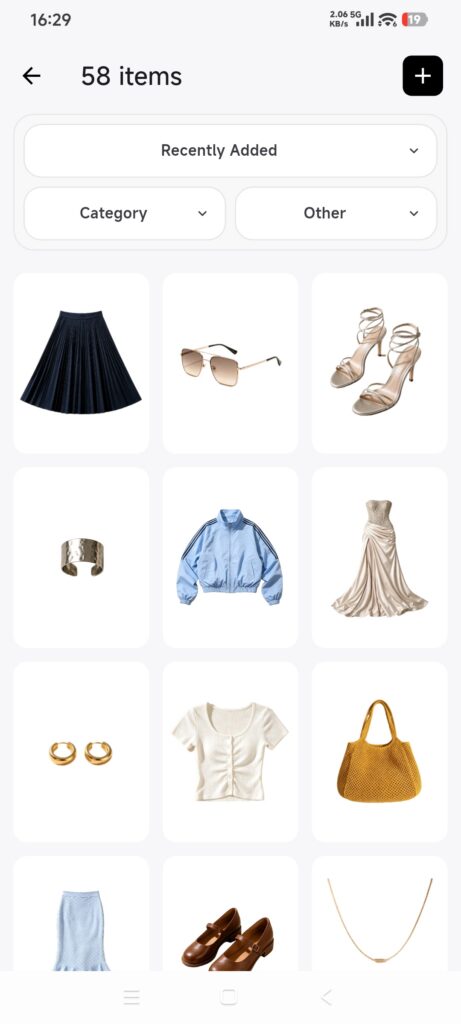
The full Item List provides Category and Other filters. If you enter a grid from one specific category, Other may offer only color.
Filter items
- Tap Category and choose a parent or child category.
- Tap Confirm.
- Tap Other for more fields.
- Choose colors, seasons, locations, tags, or sizes, or enter a price or purchase-date range.
- Tap Confirm.
- Review the count and results.
- To clear filters, open each panel, tap Reset, and confirm.
Multiple conditions narrow the results together. Items without a purchase date may still remain when filtering by purchase date in the current version.
Sort items
DressWise currently provides Recently Added, Recently Purchased, Oldest Purchase, Lowest Price, and Highest Price.
- Tap the button showing the current sort.
- Choose a sort option.
- The menu closes and the order changes immediately.
- Return to the list and check the order.
There is no manual drag order and no sort by wear count, last worn, outfit count, value, or wear rate.
Confirm it worked
- Selected conditions remain visible in the filter panel.
- The grid contains only matching items.
- A different sort changes the order.
- Reset restores the full item list.
If results look wrong
- No results: reset filters, then add one condition at a time.
- Price sorting looks incomplete: some items may not have a valid price.
- Item List is missing: return to the Closet root, tap the gear, and choose Item List.
- Only color is available: enter from the Closet root instead of a category grid.
- A new item is missing: clear filters, confirm the closet, and check recognition and sync.