Applies to
- People who do not yet have a DressWise account.
- Registration with an email address and password.
Before you begin
- Use an email address you expect to keep.
- Make sure DressWise can access the internet.
- Read the DressWise Privacy Policy and User Agreement.
Create your account
- Open DressWise and choose the registration option on the sign-in page.
- Enter your email address and check its spelling.
- Enter a password, then enter it again.
- Use at least 8 characters and make sure both passwords match.
- Agree to the Privacy Policy and User Agreement.
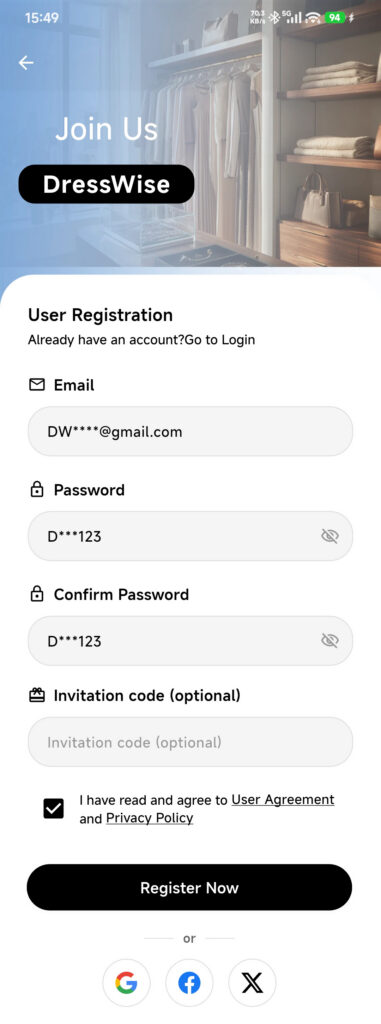
- Tap Register Account once and wait for the request to finish.
- Wait while DressWise signs you in and initializes local data.
- Create your first closet, or continue with the setup shown in the app.
Email verification is a separate account-security task. Some online features may ask you to complete it later.
Confirm it worked
- DressWise reports that registration succeeded.
- The signed-in interface opens without asking you to enter the password again.
- Closet, Outfit, the AI button, Calendar, and Me are visible.
- Your email appears under Me > Settings > System Settings > Account Security.
If you cannot register
- Invalid email: remove spaces and check the
@symbol and domain. - Passwords do not match: clear the confirmation field and type the password again.
- Password is too short: choose at least 8 characters.
- The button is unavailable: accept the agreements and check your connection.
- Email already registered: return to sign-in. Use Forgot Password if needed instead of creating another account.
- The request timed out: try signing in once with the same email before attempting registration again.
Your DressWise account, membership, and closet data belong to the DressWise service. Using the same email with another service does not merge its data with DressWise.