Open the settings
Open Me > Settings > Feature Settings. These options are saved for the current closet.
Manage seasons
- Open Seasons.
- Turn Spring, Summer, Autumn, or Winter on or off.
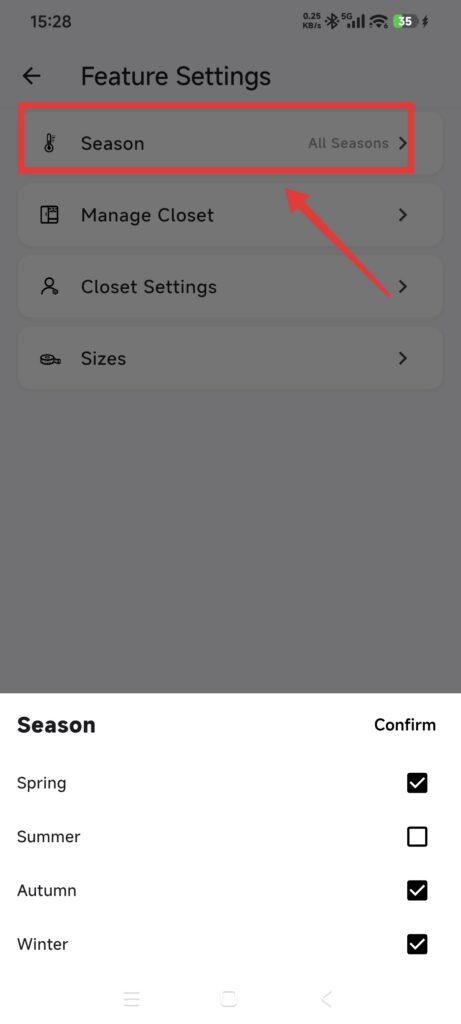
- Return to an editing page and check the available seasons.
The app supports these four fixed seasons; you cannot add a custom season name.
Manage occasions and albums
- Open Outfit Occasions or Inspiration Albums.
- Add a name, or open an existing entry to edit it.
- Read the impact notice before deleting.
Deleting an occasion moves related Outfits to the fallback occasion. Deleting an Inspiration album moves its Inspiration to No Album; it does not delete the Inspiration.
Manage tags
- Open Tags.
- Choose Item, Outfit, or Inspiration tags.
- Create a parent tag and add child tags if needed.
- Rename or delete tags you no longer need.
Tag types are independent. Names are generally limited to 32 characters and must be unique at the same level.
Confirm it worked
- Enabled seasons appear in editing pages.
- New occasions can be selected for Outfits.
- New albums can be selected for Inspiration.
- Tags appear only under the correct content type.
If something is missing
- A custom season cannot be added: only the four fixed seasons are supported.
- Inspiration remains after an album is deleted: it was moved to No Album by design.
- A tag is missing: check whether it was created for Item, Outfit, or Inspiration.
- The name is duplicated: edit the existing entry instead of adding a synonym.