Before you begin
- Have at least two wardrobes.
- Open the item details or edit page.
- Choose a target wardrobe other than the current one.
- Review whether related Inspiration, albums, diaries, and wear records may be copied; the current flow has no option to copy only the item.
Copy the item
- Open the item.
- Tap More at the bottom.
- Choose Copy to Closet.
- Check the wardrobe list. The current wardrobe is unavailable; other wardrobes are selectable.
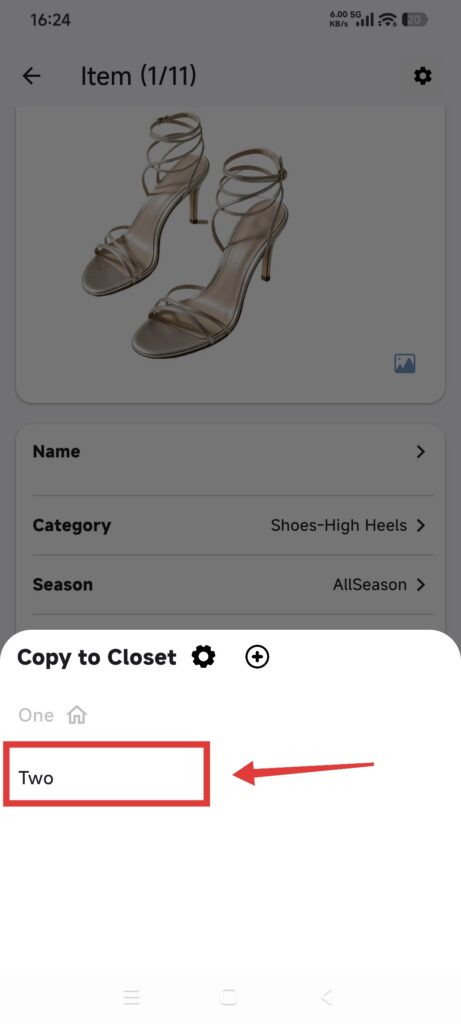
- Choose a target wardrobe.
- Wait for Copied successfully.
- Switch to the target wardrobe.
- Check the new item’s image, category, and details.
- Check related Inspiration, albums, Calendar, and diaries. Delete unwanted copies only after reviewing them.
DressWise reuses same-named categories in the target wardrobe and creates missing parent or child categories. If the source item has no valid category, the copy goes to No Category. Related Inspiration and records may use the same name or original date in the target wardrobe.
Do not confuse Copy with Move
Move to Closet changes which wardrobe owns the original and may remove relationships to outfits in the current wardrobe. If you want the item in both wardrobes, choose Copy.
Confirm it worked
- The original item remains in the source wardrobe.
- A new item appears in the target wardrobe.
- Images and expected details open in both wardrobes.
- Any copied relationships have been reviewed.
If copying does not look right
- The target is unavailable: it may be the current wardrobe.
- The copy is missing: switch to the target wardrobe and clear filters.
- Extra categories appeared: missing same-named categories are created by design.
- Extra Inspiration or records appeared: review and remove only confirmed duplicates.
- Move was selected by mistake: cancel immediately if possible, then inspect relationships before editing further.